
공격모션을 구현하기 위해 애님 몽타주를 생성한다

생성했으면 Default 이름을 Attack1으로 이름을 변경하고 Warrior Attack 1~4를 넣어준다
그리고 각 공격 별 끝 시간을 조정해 공격이 자연스럽게 이어지도록 애니메이션 재생시간을 맞춰준다
이제 어택 애니메이션 몽타주를 ABAnimInstance 에서 파일위치를 찾고 작동 할 수 있도록 코드를 작성한다.
|
1
2
3
4
5
6
7
8
9
10
11
12
13
14
15
16
17
18
19
20
21
22
23
24
25
26
27
28
|
<ABAnimInstance.h>
// Fill out your copyright notice in the Description page of Project Settings.
#pragma once
#include "ArenaBattle.h" // = EngineMinimal.h
#include "Animation/AnimInstance.h"
#include "ABAnimInstance.generated.h"
/**
*
*/
UCLASS()
class ARENABATTLE_API UABAnimInstance : public UAnimInstance
{
GENERATED_BODY()
public:
...
void PlayAttackMontage();//AttackMontage를 실행할 함수 선언
private:
...
UPROPERTY(VisibleDefaultsOnly, BlueprintReadOnly, Category = Attack, Meta = (AllowPrivateAccess = true))
UAnimMontage* AttackMontage;//언리얼에디터에서 만든 어택 몽타주를 넣을 변수
};
|
cs |
|
1
2
3
4
5
6
7
8
9
10
11
12
13
14
15
16
17
18
19
20
21
22
23
24
25
26
27
|
<ABAnimInstance.cpp>
// Fill out your copyright notice in the Description page of Project Settings.
#include "ABAnimInstance.h"
UABAnimInstance::UABAnimInstance()
{
CurrentPawnSpeed = 0.0f;
IsInAir = false;//디폴트를 false 로 해서 평소에는 땅위에있음
static ConstructorHelpers::FObjectFinder<UAnimMontage> ATTACK_MONTAGE(TEXT("/Game/Book/Animations/SK_Mannequin_Skeleton_Montage.SK_Mannequin_Skeleton_Montage"));
if (ATTACK_MONTAGE.Succeeded())
{
AttackMontage = ATTACK_MONTAGE.Object;
}//Montage파일을 찾아 AttackMontage에
}
...
void UABAnimInstance::PlayAttackMontage()
{
if (!Montage_IsPlaying(AttackMontage))
{
Montage_Play(AttackMontage, 1.0f);
}//AttackMontage를 실행한다
}
};
|
cs |
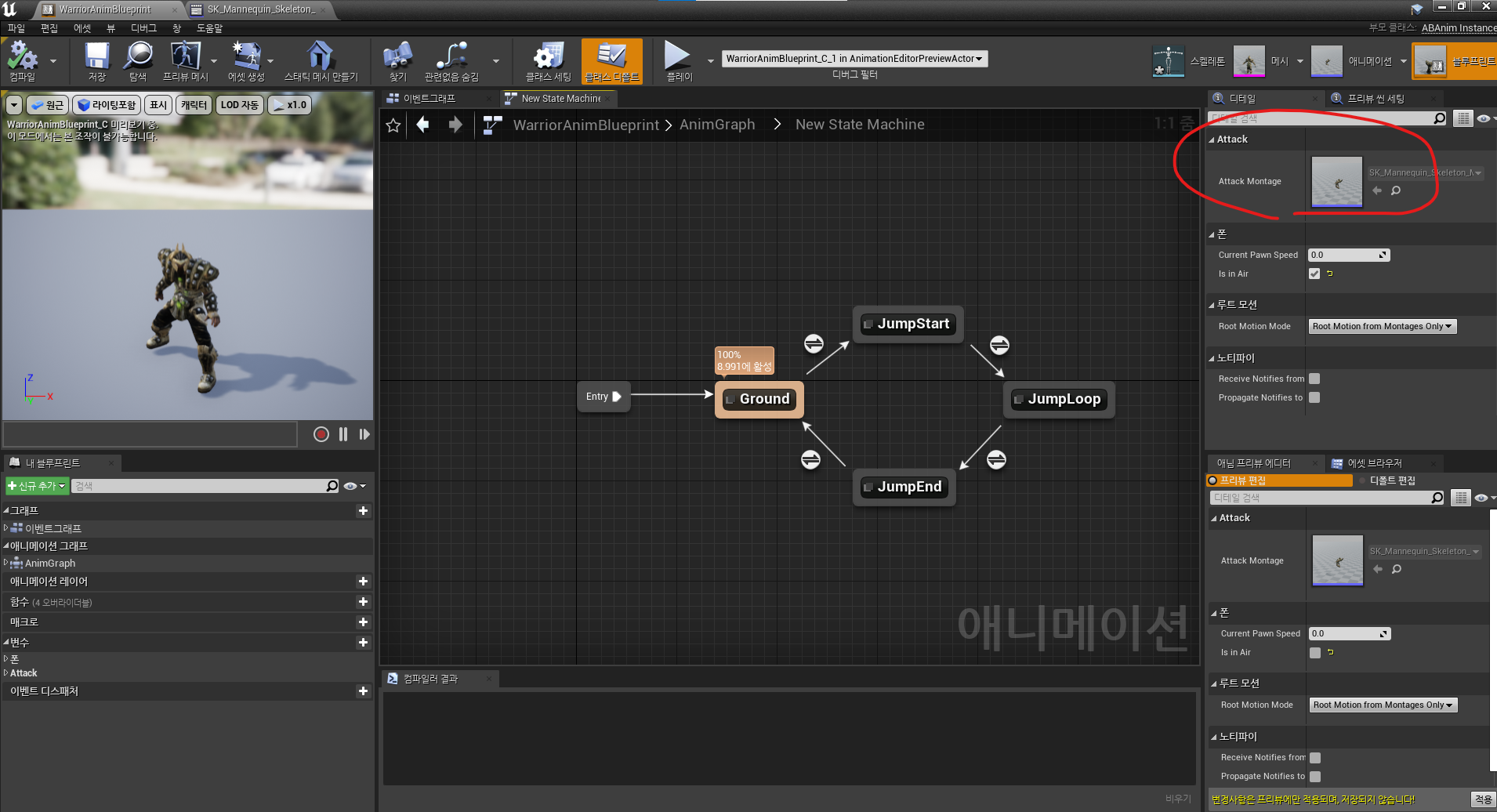
코드를 작성하고 컴파일 한 다음 WarriorAnimBlueprint로 가보면 Attack 란이 생겨있고 Attack몽타주가 들어가 있는 것을 볼 수 있다.

그리고 몽타주 재생을 담당하는 DefaultSlot을 추가하고 연결해준다

이제 만든 애니메이션을 캐릭터와 연결하기 위해 프로젝트 세팅>입력>액션 매핑에 Attack을 만들고 마우스 키는 마우스 왼쪽 버튼으로 지정한다.
|
1
2
3
4
5
6
7
8
9
10
11
|
<ABCharacter.h>
...
UCLASS()
class ARENABATTLE_API AABCharacter : public ACharacter
{
...
private:
...
void Attack();//어택키를 구현할 함수
};
|
cs |
ABCharacter 의 h파일에서 방금만든 Attack키를 구현할 함수를 선언한다
|
1
2
3
4
5
6
7
8
9
10
11
12
13
14
15
16
17
18
19
20
21
22
23
|
<ABCharacter.cpp>
#include "ABCharacter.h"
#include "ABAnimInstance.h"
...
// Called to bind functionality to input
void AABCharacter::SetupPlayerInputComponent(UInputComponent* PlayerInputComponent)
{
Super::SetupPlayerInputComponent(PlayerInputComponent);
//BeginPlay() 보다 먼저 실행되는 함수 결합할 때 사용
...
PlayerInputComponent->BindAction(TEXT("Attack"), EInputEvent::IE_Pressed, this, &AABCharacter::Attack);
}//어택키를 캐릭터에 묶어준다
...
void AABCharacter::Attack()
{
auto AnimInstance = Cast<UABAnimInstance>(GetMesh()->GetAnimInstance());
if (nullptr == AnimInstance) return;
AnimInstance->PlayAttackMontage();
}
//Attack키를 누르면 AttackMontage를 재생
|
cs |
컴파일 하고 플레이 해보면 캐릭터가 공격모션을 취하는 것을 볼 수 있다.
'언리얼 개인 프로젝트 > 언리얼엔진C++ 독학(이득우)' 카테고리의 다른 글
| 7.애니메이션 시스템의 설계_4)점프 구현2 (0) | 2022.03.06 |
|---|---|
| 7.애니메이션 시스템의 설계_2)스테이트 머신,점프 구현1 (0) | 2022.03.05 |
| 7.애니메이션 시스템의 설계_1)달리기와 멈춤 애니메이션 (0) | 2022.03.05 |
| 6.캐릭터 제작과 컨트롤_5)컨트롤 방식 변경 (0) | 2022.03.05 |
| 6.캐릭터 제작과 컨트롤_4)디아블로방식 컨트롤 구현 (0) | 2022.03.05 |